
Implementing Access Restrictions in Project for the Web iFrame
Permission in Project is GA since May 2026 and is a great addition when one would like to give visibility to the project but keep updates for dedicated members.
So, what is the "Implementing Access Restrictions in Project for the Web iFrame" feature?
Quite frequently, there is a need to give different access levels to team members of a same project.
Until now, once a user had access to a project record, he could:
• Create new tasks,
• Modify existing tasks,
• Delete tasks, dependencies, or even goals.
This lack of restrictions often led to unauthorized edits or unintentional changes, impacting timelines.
The new feature introduces a security system for Project for the web iFrame that enable clear boundaries between view-only access vs. full control access.
This means that if a user is part of project team member, his access can be limited to read-only mode.
To enable and use the feature:
Go to Parameter and Enable the feature "Permission in Project" for the Environment.
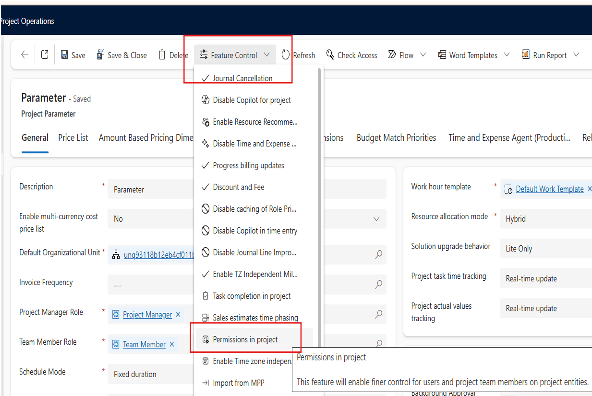
After Enabling it, go to the Project entity, select a project and in it's "team" tab, select the resource you want to update and "Edit" it.
Then in the Project Team Member related form, a "User permissions" button is accessible in the top ribbon :

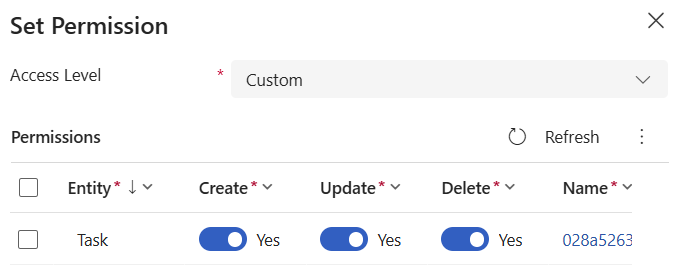
The choices are : read-only, full access or "custom"
Selecting "Custom" provides access to the form below, allowing to select specific CRUD rights for the task entity:
Happy POPS!