
Understanding Resources in Dynamics 365 Project Operations

Resources are a foundational concept in Dynamics 365 Project Operations. They sit at the intersection of project planning, delivery, time tracking, and financial execution.
This shared understanding is essential for consistent solution design, configuration, and delivery.
1. What is a Resource in Dynamics 365 Project Operations?
In Dynamics 365 Project Operations, a resource represents any capacity that can be planned, assigned, consumed, and costed as part of project delivery.
In practice, this limits us with resource types "User" and "contact", although the model also supports non‑human resources with necessary upstream analysis required.
As an example: the types "crew" or "pool" are not* fully supported in POPS as a crew is only a placeholder and members of the crew do not inherit the crew bookings or assignment, nor the pool can be used to book "one of" the pool member to a task.
The model support enabling an entity for scheduling in URS and that is only opening the door to scheduling! The rest of the features would need to be added into POPS via customizations.
A resource in Project Operations is typically implemented as a Bookable Resource record stored in Microsoft Dataverse, making it available consistently across planning, execution, and financial processes. [learn.microsoft.com]
Key characteristics of a resource
A resource may include the following attributes:
- Resource type (named person, generic role placeholder, subcontractor reference)
- Organizational unit and business unit
- Roles, skills, and proficiency levels
- Availability calendars and working time
- Target utilization and cost rates
Resources can be:
- Generic (role‑based placeholders used during planning)
- Named (actual individuals assigned to deliver work)
This distinction enables early planning before specific individuals are confirmed. [learn.microsoft.com]
2. Applications and Services Connected to Resources
Resources in Project Operations are not isolated. They are part of a broader Microsoft ecosystem that supports end‑to‑end project delivery.
Core platform
- Microsoft Dataverse – Central data model where resource records, skills, roles, bookings, and assignments are stored and shared across applications [learn.microsoft.com]
Dynamics 365 applications
- Dynamics 365 Project Operations – Primary application for project planning, resourcing, execution, time & expense, and project accounting [learn.microsoft.com]
- Dynamics 365 Field Service - Primary application for service planning, execution and invoicing on assets in the field, whether belonging to customers or internal.
- Dynamics 365 Sales – Uses resources indirectly during project estimation and transition from quote to project execution [learn.microsoft.com]
- Dynamics 365 Finance (integrated scenarios) – Consumes resource actuals for cost accounting, invoicing, and revenue recognition [learn.microsoft.com]
Microsoft Power Platform and M365
- Power BI – Resource utilization, capacity, and financial performance reporting [learn.microsoft.com]
- Power Automate – Approval flows, notifications, and resource‑related automations [learn.microsoft.com]
- Microsoft Teams – Collaboration around project delivery and resource coordination [learn.microsoft.com]
- Outlook / Exchange – Calendar availability alignment (where configured) [learn.microsoft.com]
Architectural note
Because resources are Dataverse‑based, they act as a shared master entity across the platform. Any inconsistency in resource setup directly impacts planning accuracy, utilization reporting, and financial outcomes.
3. Business Processes Involving Resources
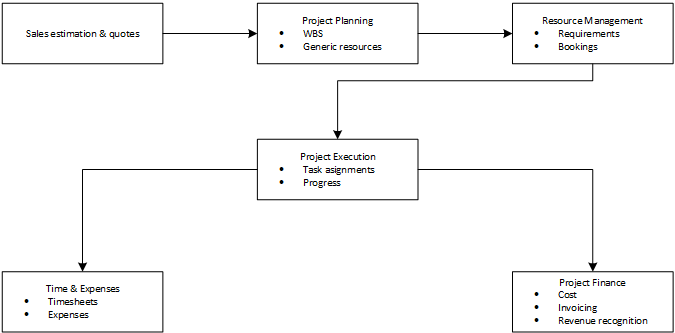
Resources are involved across the entire project lifecycle in Project Operations.
Project planning and estimation
- Use of generic resources or roles during early planning
- Effort estimation at the task level
- Alignment of demand with organizational capacity [learn.microsoft.com]
Resource requirements and staffing
- Generation of resource requirements from task assignments
- Skill‑based matching between demand and available resources
- Collaboration between project managers and resource managers [learn.microsoft.com], [learn.microsoft.com]
Resource booking and assignment
- Booking named resources to projects using centralized or hybrid resourcing models
- Assignment of resources to project tasks
- Reconciliation between bookings and task assignments [learn.microsoft.com], [learn.microsoft.com]
Project execution
- Resources perform work against assigned tasks
- Progress tracking and effort consumption
- Ongoing visibility into utilization and availability [learn.microsoft.com]
Time and expense entry
- Resources submit timesheets and expenses
- Actuals (transactions) are generated and linked back to the resource and project
- Governance through approvals and validation rules [learn.microsoft.com]
Financial management and reporting
- Resource costs drive project cost actuals
- Utilization contributes to margin and profitability analysis
- Data feeds invoicing, revenue recognition, and financial reporting [learn.microsoft.com]
4. Capability Boundaries and Known Considerations
- Project Operations does not replace an HR system. Core HR data (employment lifecycle, payroll, contracts) remains external. Only project‑relevant attributes are modeled. [learn.microsoft.com]
- Skills, roles, and calendars require governance. Poor data quality directly affects resource matching and utilization insights.
- Some advanced staffing workflows may require Power Automate or custom Power Apps to align with client‑specific approval models. This is a common and supported extension pattern. [learn.microsoft.com]
No unsupported or undocumented workaround has been identified in the reviewed sources.
5. Why This Matters for Solution Delivery
From a delivery perspective:
- Resources are not just a setup task; they are a cross‑cutting design decision
- Early alignment on resource modeling avoids downstream rework in:
- Scheduling
- Time entry
- Financial integration
- Reporting
A consistent understanding of resources is critical to delivering scalable, supportable Project Operations solutions.
6. Action Items in a delivery context
- Confirm resource governance model (roles, skills, ownership) early in solution design
- Align resourcing mode (central vs. hybrid) with client operating model
- Validate integrations with Finance, HRIS, and reporting during early solution design
- Document client‑specific extensions (Power Automate / Power Apps) related to resourcing approvals
- Document clients decision in ADO via user stories